Harness the Power of Document .Net: Adding Pictures in C#
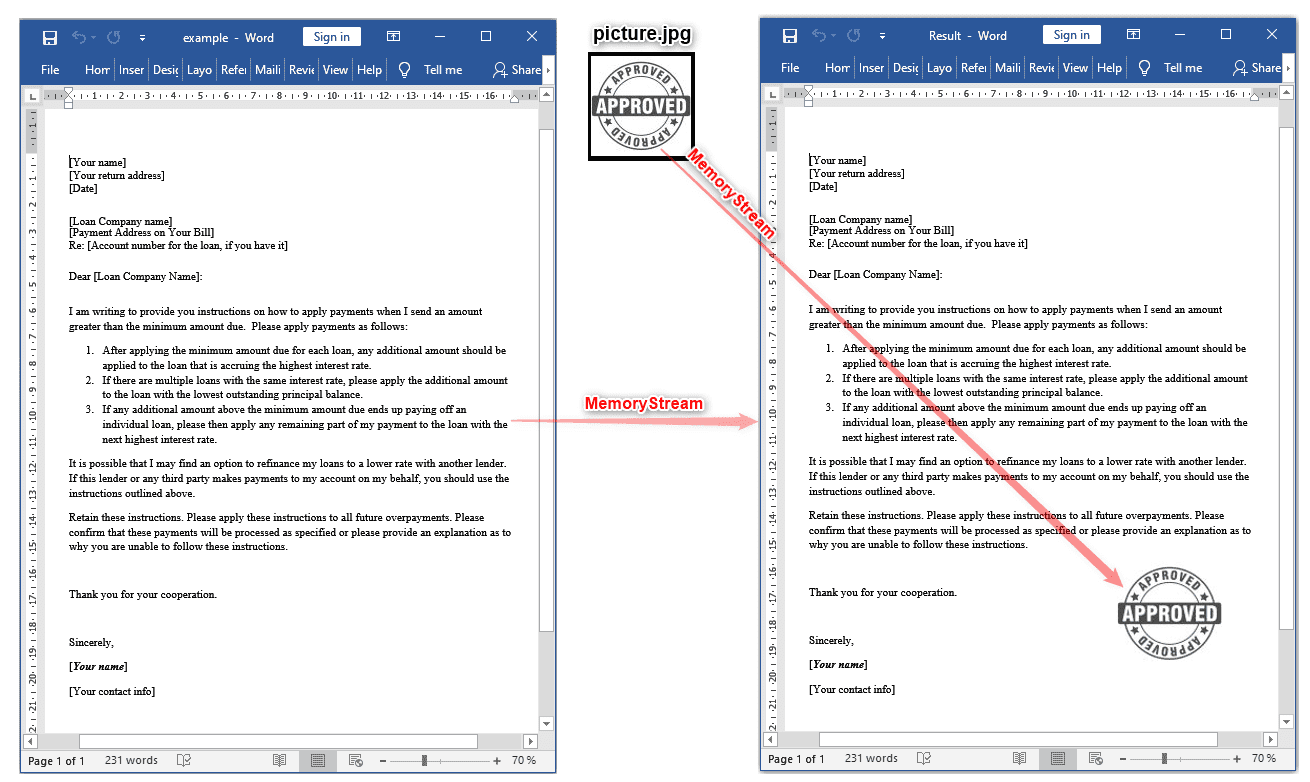
Complete code
 GitHub
using System;
using System.IO;
using SautinSoft.Document;
using SautinSoft.Document.Drawing;
namespace Sample
{
class Sample
{
static void Main(string[] args)
{
// Get your free 30-day key here:
// https://sautinsoft.com/start-for-free/
AddPictureToDocxInMemory();
}
/// <summary>
/// How to add picture into an existing DOCX document using MemoryStream.
/// </summary>
/// <remarks>
/// Details: https://sautinsoft.com/products/document/help/net/developer-guide/add-picture-in-docx-document-in-memory-net-csharp-vb.php
/// </remarks>
public static void AddPictureToDocxInMemory()
{
// We're using files here only to retrieve the data from them and show the results.
// The whole process will be done completely in memory using MemoryStream.
string inputFile = @"..\..\..\example.docx";
string outputDocxFile = @"Result.docx";
string outputPdfFile = @"Result.pdf";
string pictPath = @"..\..\..\picture.jpg";
// 1. Load the input data into memory (from DOCX document and the picture).
byte[] inputDocxBytes = File.ReadAllBytes(inputFile);
byte[] pictBytes = File.ReadAllBytes(pictPath);
// 2. Create new MemoryStream with DOCX and load it into DocumentCore.
DocumentCore dc = null;
using (MemoryStream msDocx = new MemoryStream(inputDocxBytes))
{
dc = DocumentCore.Load(msDocx, new DocxLoadOptions());
}
// 3. Create new Memory Stream, and Picture object for the picture.
Picture pict = null;
// Set the picture size in mm.
int width = 40;
int height = 40;
Size size = new Size(LengthUnitConverter.Convert(width, LengthUnit.Millimeter, LengthUnit.Point),
LengthUnitConverter.Convert(height, LengthUnit.Millimeter, LengthUnit.Point));
// Set the picture layout from the (left, top) page corner.
int fromLeftMm = 140;
int fromTopMm = 180;
// Floating layout means that the Picture (or Shape) is positioned by coordinates.
FloatingLayout fl = new FloatingLayout(new HorizontalPosition(fromLeftMm, LengthUnit.Millimeter, HorizontalPositionAnchor.Page),
new VerticalPosition(fromTopMm, LengthUnit.Millimeter, VerticalPositionAnchor.TopMargin), size);
// Load the picture
using (MemoryStream msPict = new MemoryStream(pictBytes))
{
pict = new Picture(dc, fl, msPict, PictureFormat.Jpeg);
}
// Set the wrapping style.
(pict.Layout as FloatingLayout).WrappingStyle = WrappingStyle.Tight;
// Add our picture into the 1st section.
Section sect = dc.Sections[0];
sect.Content.End.Insert(pict.Content);
// Save our document into DOCX format using MemoryStream.
using (MemoryStream msDocxResult = new MemoryStream())
{
dc.Save(msDocxResult, new DocxSaveOptions());
// To show the result save our msDocxResult into file.
File.WriteAllBytes(outputDocxFile, msDocxResult.ToArray());
// Open the result for demonstration purposes.
System.Diagnostics.Process.Start(new System.Diagnostics.ProcessStartInfo(outputDocxFile) { UseShellExecute = true });
}
// Save our document into PDF format using MemoryStream.
using (MemoryStream msPdfResult = new MemoryStream())
{
dc.Save(msPdfResult, new PdfSaveOptions());
// To show the result save our msPdfResult into file.
File.WriteAllBytes(outputPdfFile, msPdfResult.ToArray());
// Open the result for demonstration purposes.
System.Diagnostics.Process.Start(new System.Diagnostics.ProcessStartInfo(outputPdfFile) { UseShellExecute = true });
}
}
}
}Imports System
Imports System.IO
Imports SautinSoft.Document
Imports SautinSoft.Document.Drawing
Namespace Sample
Friend Class Sample
Shared Sub Main(ByVal args() As String)
AddPictureToDocxInMemory()
End Sub
''' Get your free 30-day key here:
''' https://sautinsoft.com/start-for-free/
''' <summary>
''' How to add picture into an existing DOCX document using MemoryStream.
''' </summary>
''' <remarks>
''' Details: https://sautinsoft.com/products/document/help/net/developer-guide/add-picture-in-docx-document-in-memory-net-csharp-vb.php
''' </remarks>
Public Shared Sub AddPictureToDocxInMemory()
' We're using files here only to retrieve the data from them and show the results.
' The whole process will be done completely in memory using MemoryStream.
Dim inputFile As String = "..\..\..\example.docx"
Dim outputDocxFile As String = "Result.docx"
Dim outputPdfFile As String = "Result.pdf"
Dim pictPath As String = "..\..\..\picture.jpg"
' 1. Load the input data into memory (from DOCX document and the picture).
Dim inputDocxBytes() As Byte = File.ReadAllBytes(inputFile)
Dim pictBytes() As Byte = File.ReadAllBytes(pictPath)
' 2. Create new MemoryStream with DOCX and load it into DocumentCore.
Dim dc As DocumentCore = Nothing
Using msDocx As New MemoryStream(inputDocxBytes)
dc = DocumentCore.Load(msDocx, New DocxLoadOptions())
End Using
' 3. Create new Memory Stream, and Picture object for the picture.
Dim pict As Picture = Nothing
' Set the picture size in mm.
Dim width As Integer = 40
Dim height As Integer = 40
Dim size As New Size(LengthUnitConverter.Convert(width, LengthUnit.Millimeter, LengthUnit.Point), LengthUnitConverter.Convert(height, LengthUnit.Millimeter, LengthUnit.Point))
' Set the picture layout from the (left, top) page corner.
Dim fromLeftMm As Integer = 140
Dim fromTopMm As Integer = 180
' Floating layout means that the Picture (or Shape) is positioned by coordinates.
Dim fl As New FloatingLayout(New HorizontalPosition(fromLeftMm, LengthUnit.Millimeter, HorizontalPositionAnchor.Page), New VerticalPosition(fromTopMm, LengthUnit.Millimeter, VerticalPositionAnchor.TopMargin), size)
' Load the picture
Using msPict As New MemoryStream(pictBytes)
pict = New Picture(dc, fl, msPict, PictureFormat.Jpeg)
End Using
' Set the wrapping style.
TryCast(pict.Layout, FloatingLayout).WrappingStyle = WrappingStyle.Tight
' Add our picture into the 1st section.
Dim sect As Section = dc.Sections(0)
sect.Content.End.Insert(pict.Content)
' Save our document into DOCX format using MemoryStream.
Using msDocxResult As New MemoryStream()
dc.Save(msDocxResult, New DocxSaveOptions())
' To show the result save our msDocxResult into file.
File.WriteAllBytes(outputDocxFile, msDocxResult.ToArray())
' Open the result for demonstration purposes.
System.Diagnostics.Process.Start(New System.Diagnostics.ProcessStartInfo(outputDocxFile) With {.UseShellExecute = True})
End Using
' Save our document into PDF format using MemoryStream.
Using msPdfResult As New MemoryStream()
dc.Save(msPdfResult, New PdfSaveOptions())
' To show the result save our msPdfResult into file.
File.WriteAllBytes(outputPdfFile, msPdfResult.ToArray())
' Open the result for demonstration purposes.
System.Diagnostics.Process.Start(New System.Diagnostics.ProcessStartInfo(outputPdfFile) With {.UseShellExecute = True})
End Using
End Sub
End Class
End Namespace
If you need a new code example or have a question: email us at support@sautinsoft.com or ask at Online Chat (right-bottom corner of this page).